Your Bracket, Your Rules: Introducing Manual Mode for the World Cup 2026 Simulator
For months, the World Cup 2026 Simulator has been your go-to tool for exploring the endless possibilities of the 48-team tournament. You’ve used the ELO-powered "Simulate Group Stage" button to run thousands of scenarios, you’ve played with the "Chaos Factor" to uncover wild underdog stories, and you’ve shared your brackets with the world. The simulator has been a tool for discovering what could happen.
Today, we’re handing you the keys to the kingdom. We're thrilled to introduce a feature that many of you have asked for: Manual Mode for the Group Stage.
No more leaving it up to an algorithm. No more hoping for a specific outcome. You now have the power to decide exactly how the group stage unfolds. This isn't a tool for discovery; it's a tool for creation. It’s for the fans who know their stuff and want to build a bracket that reflects their own footballing wisdom.
What is Manual Mode?
Manual Mode is a powerful new feature on the Group Ranking page that puts you in complete control of the group stage outcome. Instead of clicking the "Simulate Group Stage" button and letting our ELO-based algorithm predict the results, you can now personally assign the finishing order for every single team in all 12 groups.
- You Decide First Place: Think Brazil will dominate their group? Put them in first.
- You Pick the Runner-Up: Have a feeling the Netherlands will cruise into second? The choice is yours.
- You Determine the Drama: Will a powerhouse stumble and finish third, creating a dangerous knockout stage floater? You can make it happen.
This feature transforms the simulator from a predictive tool into a creative one. It's built for the football purist, the office pool strategist, and the fan who wants to see their dream tournament come to life, one pick at a time.
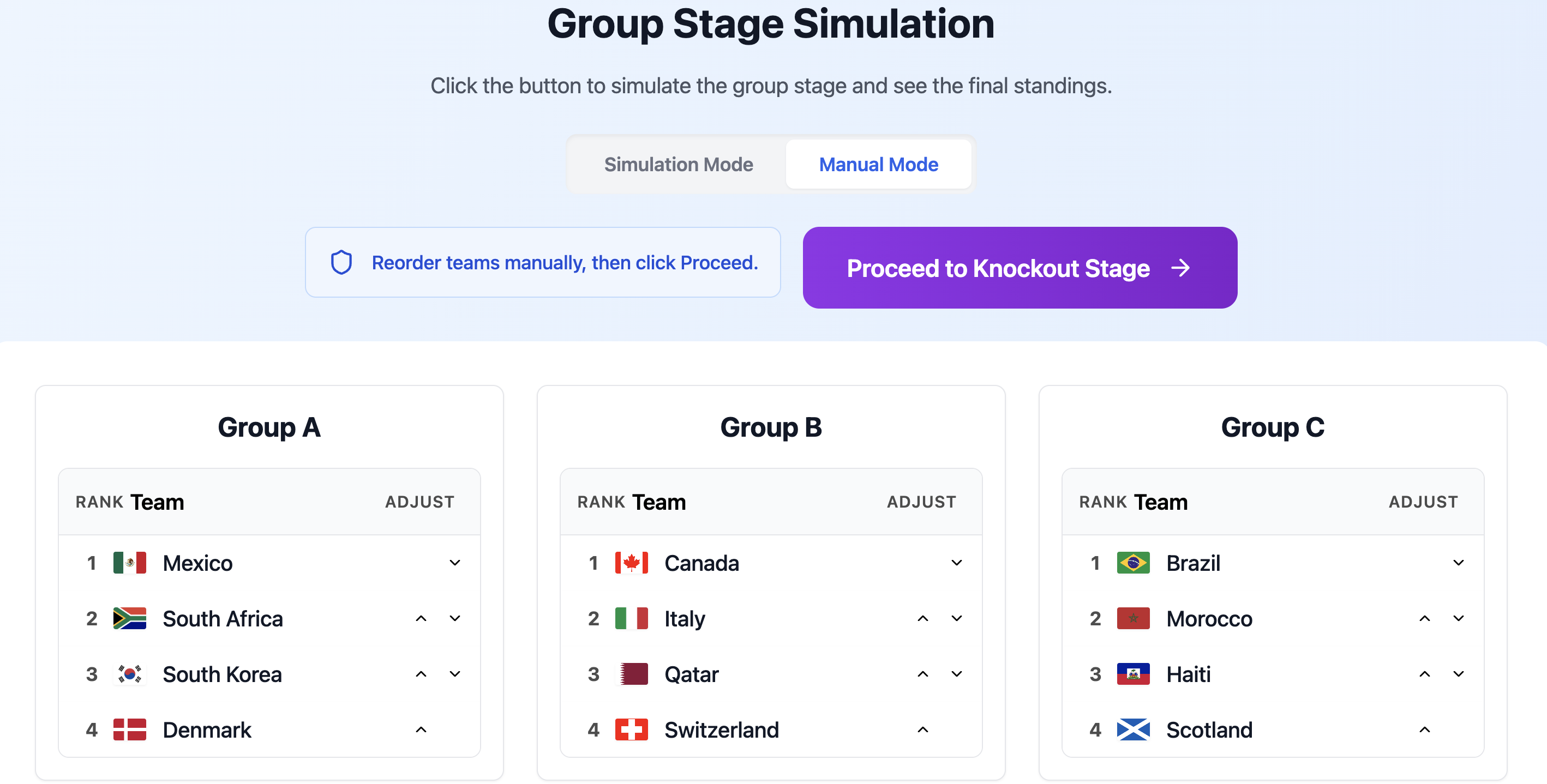
The new Manual Mode interface gives you dropdown controls to set the exact finishing order for each group.
How to Use Manual Mode: A Step-by-Step Guide
We’ve designed Manual Mode to be intuitive and powerful. Here’s how you can craft your perfect group stage in minutes:
- Navigate to the Group Ranking Page: After you’ve reviewed the official draw on the Draw page, head over to the Group Ranking page.
- Select "Manual" Mode: At the top of the page, you'll see a new toggle. Switch it from "Simulate" to "Manual." This will reveal dropdown menus next to each team in every group.
- Assign Rankings for Each Group: For each of the 12 groups (A through L), use the dropdowns to assign each team a finishing position: 1st, 2nd, 3rd, or 4th. The simulator will ensure you can't assign the same rank to two different teams within the same group.
- Review Your Selections: Once you've set the rankings for all 48 teams, take a moment to review your work. This is your vision of the group stage.
- Proceed to Knockout Stage: Click the "Proceed to Knockout Stage" button. The simulator will take your manual rankings and instantly generate the full 32-team knockout bracket.
It's that simple. You have the ultimate control to create your bracket from the ground up.
The Automation Magic: We Still Do the Hard Part for You
The most complex part of the new 48-team format is determining which 8 of the 12 third-place teams advance to the Round of 32. This process involves ranking all third-place teams and then using a convoluted FIFA combination matrix to decide their knockout opponents. For a full breakdown, you can read our guide on how the group stage and draw work.
Even in Manual Mode, you don’t have to worry about this.
When you click "Proceed to Knockout Stage," our simulator:
- Takes the 12 teams you manually assigned to third place.
- Automatically ranks them based on a standardized model (using FIFA ranking as the primary tie-breaker).
- Identifies the top 8 advancing teams.
- Consults the official FIFA combination matrix to determine the correct Round of 32 matchups.
- Populates the entire knockout bracket for you.
This gives you the best of both worlds: complete control over the group rankings, with the convenience of automated knockout bracket generation. You get to make the predictions; we handle the complex logistics.
Why We Built This: For the Football Connoisseurs
While the ELO simulation is a fantastic way to see statistically likely outcomes, we know that many of you are true students of the game. You watch the leagues, you follow the players, and you have your own deeply-researched opinions on who will perform and who will disappoint. Manual Mode is for you.
We built this feature for:
- The Analyst: The fan who has scouted every team and wants to build a bracket based on tactical matchups and player form.
- The Office Pool Champion: The person who needs to fill out a precise bracket for a competition and can't leave it to chance.
- The Storyteller: The fan who wants to create a dream run for an underdog nation or see what happens if all the favorites advance without a single upset.
- The "What If" Explorer: The user who wants to test specific scenarios, like "What if both Messi and Ronaldo win their groups?" or "What happens if a Group of Death produces a surprise winner?"
This new mode complements our existing simulation features, offering a complete suite of tools for every type of football fan. For a complete overview of all features, be sure to check out our ultimate guide on how to use the World-cup simulator.
Your World Cup, Your Way
With the introduction of Manual Mode, the World Cup 2026 Simulator is now the most comprehensive and flexible prediction tool available. You can choose to discover the future with our ELO simulation or create it yourself with your own two hands.
So, what are you waiting for? Do you believe in the favorites, or are you predicting a tournament of upsets? Head over to the simulator, switch to Manual Mode, and build the World Cup bracket you know is going to happen.