How to Check Your FIFA World Cup 2026 Random Selection Draw Results Immediately
The moment millions of football fans have been waiting for is finally here—or is it?
We all circled February 5th on our calendars. That was the date FIFA officially stated that successful applicants for the FIFA World Cup 2026 Random Selection Draw would be notified by email. Fans across the globe spent yesterday refreshing their inboxes, checking spam folders, and scouring Reddit /r/WorldCup for any sign of life.
But for the vast majority, the result was… silence.
As of today, February 6th, reports from social media platforms like Reddit and Twitter indicate that almost no one has received an official email confirming their allocation or rejection. The anxiety is palpable. Did the draw happen? Is there a delay? Did I miss the notification?
While FIFA appears to still be processing the massive volume of results on the backend, savvy fans have discovered a "backdoor" method to check your status right now. You don't need to wait for the email to land in your inbox. If you were successful, your ticket invoice is likely already waiting for you on the FIFA ticketing portal—you just need to know exactly where to look.
In this guide, we will walk you through the step-by-step process to find your FIFA ticket draw results immediately, explain what to do if you’ve won, and guide you on the next steps if your account is seemingly empty.
Note: This method is currently working for many users, but high traffic to the FIFA portal may cause slowdowns. Be patient if the page takes a moment to load.
The "Hidden" Method to Check Your Draw Status
It appears that while the emails haven't been dispatched, the database has been updated for many successful applicants. The "My Applications" page on the standard portal might not show the change yet, but the "Files" section—where invoices are stored—is live.
Here is the exact workflow to check if you have secured tickets for the 2026 World Cup:
Step 1: Log In to the Official Portal
First, make sure you are logged into your FIFA ticketing account. Go to the main ticketing hub:
https://www.fifa.com/en/tournaments/mens/worldcup/canadamexicousa2026/tickets
Click on "Tickets" or "Login" in the top right corner. Ensure you are using the exact same email address that you used to submit your Random Selection Draw application.
Step 2: Navigate to the "Files" URL
Once you are logged in, simply clicking around the dashboard might not show you what you're looking for. The standard interface often caches old status messages like "Pending" or "Received."
Instead, copy and paste the following URL directly into your browser's address bar:
https://fifa-fwc26-us.tickets.fifa.com/account/files?
Step 3: Check for Invoices
This link takes you directly to the document repository for your account. This is where FIFA stores official documents related to your orders, such as payment confirmations and invoices.
- If you see tickets: Congratulations! This is a massive indicator that your application was successful (at least in part). Below is a screenshot of a successful FIFA World Cup 2026 ticket draw application showing the tickets in the user account.
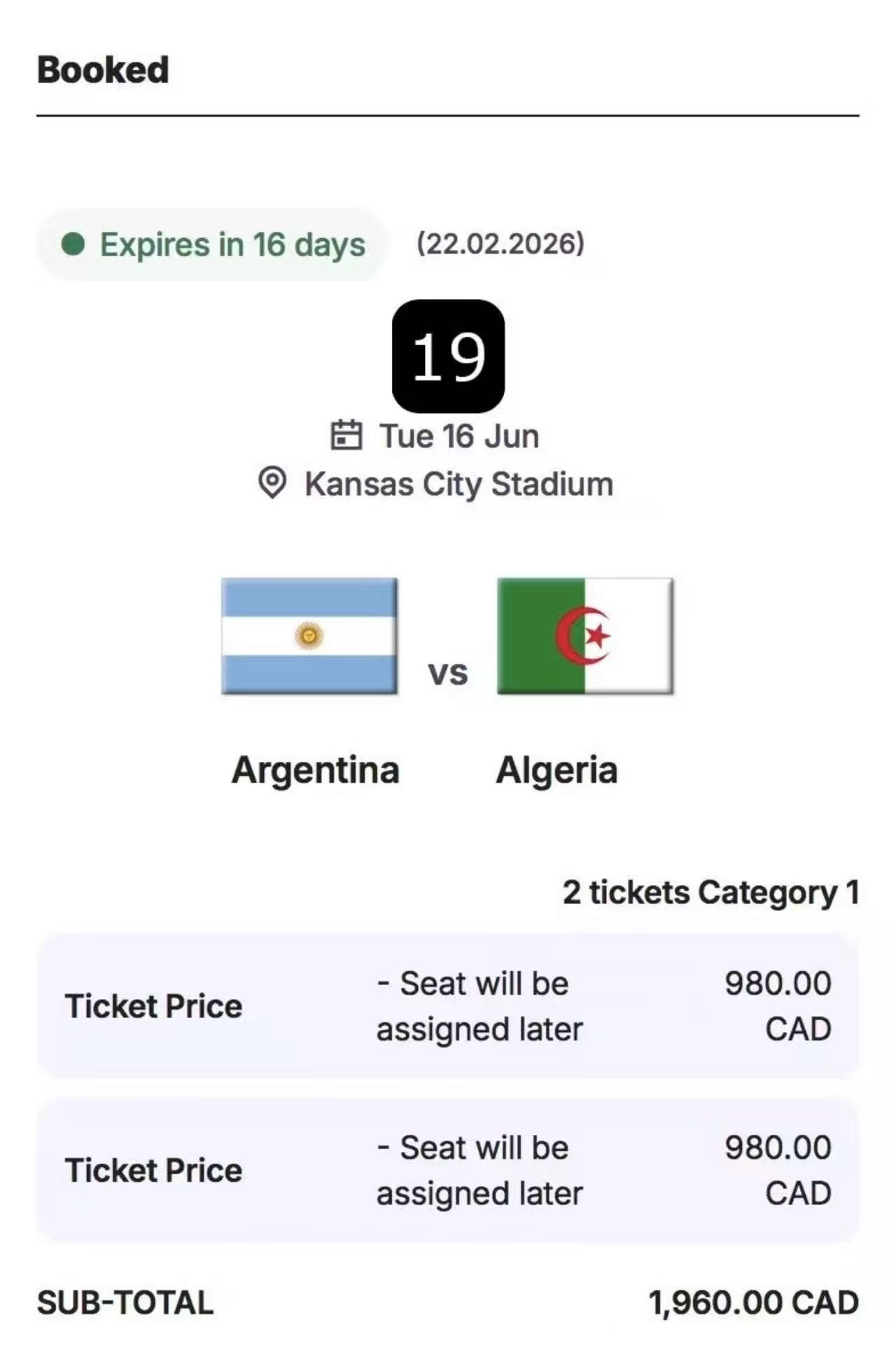
- If the list is empty: Do not panic yet. It means there is no invoice generated for you at this moment. It could mean you were unsuccessful, but it could also mean the system is still processing your specific batch.
I Found a File/Invoice! What’s Next?
First of all, take a deep breath and celebrate—you are going to the World Cup!
However, your journey isn't over. In fact, the most critical step is happening right now. Finding the notification is useless if you miss the payment window.
1. Verify the Matches
The invoice will likely list Match Numbers (e.g., Match 13, Match 42) rather than "USA vs Italy". You will need to cross-reference these match numbers with the official schedule.
If you want to visualize where you'll be sitting, check out our comprehensive guide on World Cup 2026 Stadium Seat Maps & Ticket Categories. We break down exactly where "Category 1" vs "Category 3" is located in every host stadium, from MetLife to the Azteca.
2. Prepare Your Credit Card
FIFA is strict about payment methods. Ensure your card has:
- Sufficient Limit: Ticket bundles can cost thousands of dollars.
- International Authorization: The transaction might be processed in a different country/currency (though usually USD for this tournament), triggering fraud alerts. Call your bank now to authorize a large transaction from FIFA.
"I Don't See Any Files" – Am I Out of Luck?
If you visited the link above and saw a blank page saying "No files found," your heart might have sunk. But is it game over?
Not necessarily.
Here is why you shouldn't lose hope just yet:
- Rolling Updates: The FIFA Random Selection Draw is a massive logistical operation involving millions of applications. The results are likely being uploaded in batches. Just because your account hasn't been updated yet doesn't mean it won't be in the next few hours or days.
- Payment Failures from Others: Believe it or not, many people win tickets but fail to pay (card declines, missed emails). When those tickets are forfeited, FIFA often performs a "mini-reallocation" to the next people on the reserve list.
- The "Unsuccessful" Email: FIFA will eventually send an email explicitly stating if your application was "Unsuccessful." Until you receive that definitive rejection, you are technically still in limbo.
While You Wait: Check Your Strategy
Did you apply for the Final or the Opening Match? Those are the hardest tickets to get. If you want to understand why some people won and others didn't, read our deep dive on World Cup 2026 Random Selection Draw Strategy. It explains the probability mechanics behind the lottery.
Frequently Asked Questions (FAQ)
When will the official emails be sent?
FIFA originally stated February 5th. Since that deadline has passed without mass emails, it is highly likely they will start arriving today (Feb 6th) or over the weekend. The "files" method simply bypasses the email server delay.
Can I reject some tickets but keep others?
No. The Random Selection Draw is strictly "All or Nothing per Application." If you applied for a TST (Team Specific Ticket) series and got it, you must buy the whole series. You cannot choose to keep the Group Stage matches but return the Final. This is why we warned users to be careful with their "Payment Card" details—some fans generally get charged $5,000+ automatically!
I won tickets for a match I can't attend. Can I sell them?
Yes, but only via the official FIFA Resale Platform.
- Do not try to sell them on StubHub or Viagogo yet. The tickets are digital and tied to your account.
- The official Resale Platform typically opens a few months before the tournament.
- You will be able to sell them at face value (minus a small resale fee). Scalping is strictly prohibited and can lead to ticket cancellation.
Is this the last chance to get tickets?
Absolutely not! If you checked the link and truly strike out, there are still two major opportunities:
- First Come, First Served (FCFS) Phase: Usually taking place a few months after the draw. This is a digital queue—fastest fingers first.
- Last Minute Sales: Occurring right before and during the tournament in 2026.
Visualize the Tournament While You Wait
Whether you won tickets or are still waiting, the excitement for 2026 is real. The tournament bracket is going to be the largest in history with 48 teams.
Who will your team face? Will they play in the city you just won tickets for?
While we wait for the official Group Draw (late 2025), you can simulate the entire tournament right now.
Our Interactive World Cup Simulator allows you to:
- Set your own group seeds.
- Simulate the Random Selection Draw for groups.
- Play out the Knockout Stages to see who lifts the trophy.
It’s the best way to kill time while refreshing your email inbox!
Summary
To recap, if you are looking for your FIFA ticket draw results or wondering about the status of the FIFA random selection draw:
- Login to FIFA.com.
- Visit https://fifa-fwc26-us.tickets.fifa.com/account/files?.
- Look for any invoice files.
- Check your credit card for pending charges.
Good luck to everyone! We hope to see you in the stands in 2026. If you found this tip helpful, share it with your friends who are also nervously waiting!